For Marketing Leaders
I’ll be honest with you from the start. Google Ads is a beast. It has hundreds of settings, automation features that change every few months, bidding strategies, audiences, assets and reports. After years of managing accounts for businesses at Mindesigns, I’ve learned that doing it well takes two different skills together. You need to understand how the platform works, and you need to be a good marketer who knows what makes a person pick up the phone.
The type of business matters a lot too. In my experience, simple local services like air conditioning, electrical and plumbing tend to be easier. People search with clear intent (“air con repair near me”), the job is easy to understand, and the path to a lead is short. B2B and more complex products and services are harder. Clicks usually cost more, the sales cycle is longer, and one lead rarely equals one sale, so making a return takes more patience and much tighter tracking.
In this guide, I won’t try to cover everything in Google Ads. I’ll focus on what our Google Ads audits usually cover and the handful of areas I’ve seen make the biggest difference in results across the accounts we manage. At the end, I’ve included a 20-step Google Ads audit checklist based on the process our team uses in real client accounts.
What Is a Google Ads Audit?
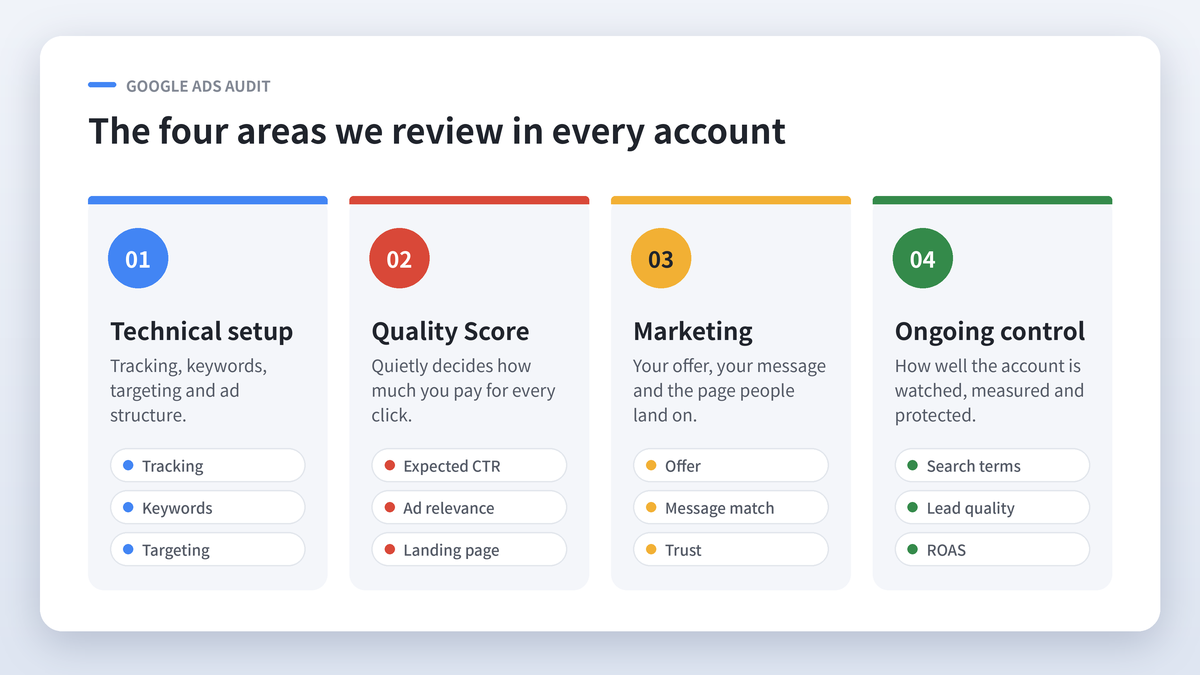
A Google Ads audit is a structured review of your account to find wasted spend, missed opportunities and anything stopping your ads from turning clicks into customers. When we audit an account, we look at four areas.
- The technical setup, meaning tracking, keywords, targeting and ad structure
- Quality Score, which quietly decides how much you pay for every click
- The marketing, meaning your offer, your message, and the page people land on
- Ongoing control, meaning how well the account is watched, measured and protected over time
Let me walk you through each one.
General Setup: Get the Foundations Right
The technical side is the part everyone can get right. It follows clear rules, and it’s usually the easiest area to fix. It’s also where I see a lot of accounts fall over, because a small setup mistake quietly ruins every decision after it.
Conversions need to work
Everything starts here. If Google can’t see which clicks turn into calls, form fills or sales, it can’t optimise toward them, and you can’t tell which keywords are making you money. When we audit an account, we check that every conversion action is firing correctly, that each one is counted properly (one lead per enquiry, not five), and that phone calls from ads and from the website are tracked. We also make sure Google Analytics is linked to Google Ads.
Here’s a quick test I always recommend. Submit your own contact form and see whether the conversion shows up in Google Ads within a day. If it doesn’t, stop and fix that before you touch anything else.
Keywords
Your keywords decide who sees your ads. The healthiest accounts I work on have ad groups built around tight themes, ideally 10 to 15 closely related keywords each. That way the ad and landing page can speak directly to what the person searched for. We also go through the search terms report, which shows the actual searches that triggered your ads, and add negative keywords to block anything irrelevant.
Ad quality
I like every ad group to have ads with an Ad Strength of “Good” or “Excellent”, headlines that include the keyword, and as many relevant assets as possible (site links, call-outs, call assets, location, images and promotions). More assets make your ad bigger on the page, and a bigger ad usually earns a higher click through rate.
Targeting
Check your location targeting carefully. Google’s default setting can show ads to people who are only “interested in” your area rather than physically in it. I’ve seen a Cairns business end up paying for clicks from Melbourne because of that one setting. While you’re there, check your ad schedule, device settings and language targeting.
How we set up an account for success
When we take on a new account at Mindesigns, our setup process looks like this.
- We confirm the business goals, budget, service areas and what counts as a lead
- We set up and test conversion tracking for forms, calls and any online sales
- We research keywords and group them into tight, service specific ad groups
- We write ads that mirror those keywords, with every relevant asset switched on
- We match each ad group to the most relevant landing page
- We set location, schedule and device targeting to suit how the business actually operates
- We start with a bidding strategy that suits the amount of conversion data available, then adjust as data builds
When this is right, every optimisation after it has something solid to build on.
Quality Score: The Hidden Number That Sets Your Cost Per Click
If there’s one metric I think business owners underestimate, it’s Quality Score.
What is Quality Score?
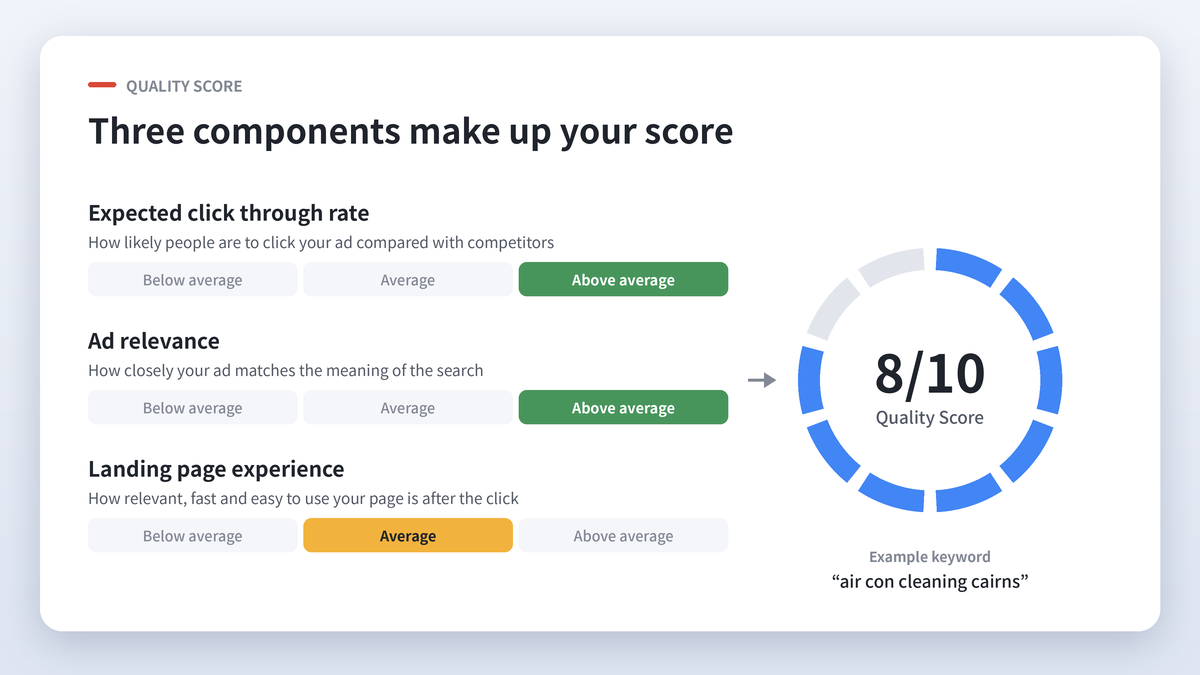
Quality Score is Google’s rating, from 1 to 10, of how relevant and useful your keyword, ad and landing page are to the person searching. You can see it for each keyword in your account by adding the Quality Score columns to the keywords view.
It’s built from three components, each rated “Below average”, “Average” or “Above average”.
- Expected click through rate is how likely people are to click your ad compared with competitors
- Ad relevance is how closely your ad matches the meaning of the search
- Landing page experience is how relevant, fast and easy to use your page is once someone clicks
How Quality Score affects what you pay
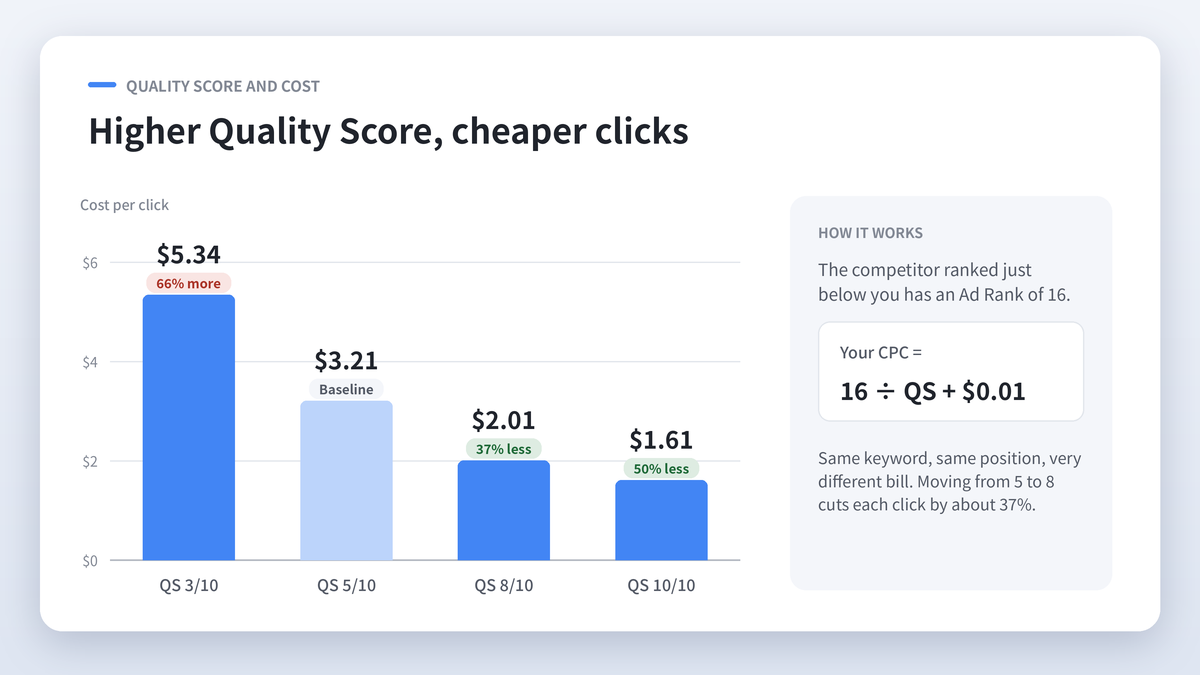
Google decides whose ad shows, and in what position, using Ad Rank. In simple terms, Ad Rank is roughly your maximum bid multiplied by your Quality Score (Google now includes other factors, but this shows how it works). With the common simplified formula, what you actually pay per click is the Ad Rank of the advertiser just below you, divided by your Quality Score, plus one cent.
Say the competitor ranked below you has an Ad Rank of 16. Here’s what you’d pay per click at different Quality Scores.
| Your Quality Score | Your Cost Per Click | Compared With a Score of 5 |
|---|---|---|
| 3/10 | $5.34 | 66% more |
| 5/10 | $3.21 | Baseline |
| 8/10 | $2.01 | 37% less |
| 10/10 | $1.61 | 50% less |
Same keyword, same position, very different bill. Over thousands of clicks a month, moving from 5 to 8 can save you thousands of dollars, or give you thousands of dollars more reach for the same budget.
Improving the three components
Ad relevance gets better when the searcher’s words appear in your ad. If someone searches “air con cleaning Cairns”, your headline should say air con cleaning in Cairns. Tight ad groups make this possible, because one set of ads can’t be highly relevant to 60 different keywords.
Expected click through rate improves with specific, compelling ads. Numbers, offers, prices, reviews and full use of assets all lift CTR. As a rule of thumb, I look for a CTR of 2% or higher on search campaigns.
Landing page experience improves when the page matches the ad, loads fast, is easy to use on mobile and makes the next step obvious.
Case study: Easy Cool Air
Easy Cool Air is an air conditioning business we manage Google Ads for. When we took over, many of their core keywords, such as “air con Cairns” and “air con cleaning Cairns”, sat at a Quality Score of around 5/10.
We made two main changes. First, we moved the ads to a landing page with less clutter that loaded much faster. Second, we matched the keywords through the whole journey, so the search term appeared in the ad headline, the ad copy and the landing page itself.
Within about a month, Quality Score on a group of those keywords rose from 5/10 to 8/10. That gave the business room to scale its Google Ads spend from $3,000 to $10,000 a month while holding the cost per lead steady at around $80. In practice, that meant roughly three times as many leads each month at the same cost per lead.
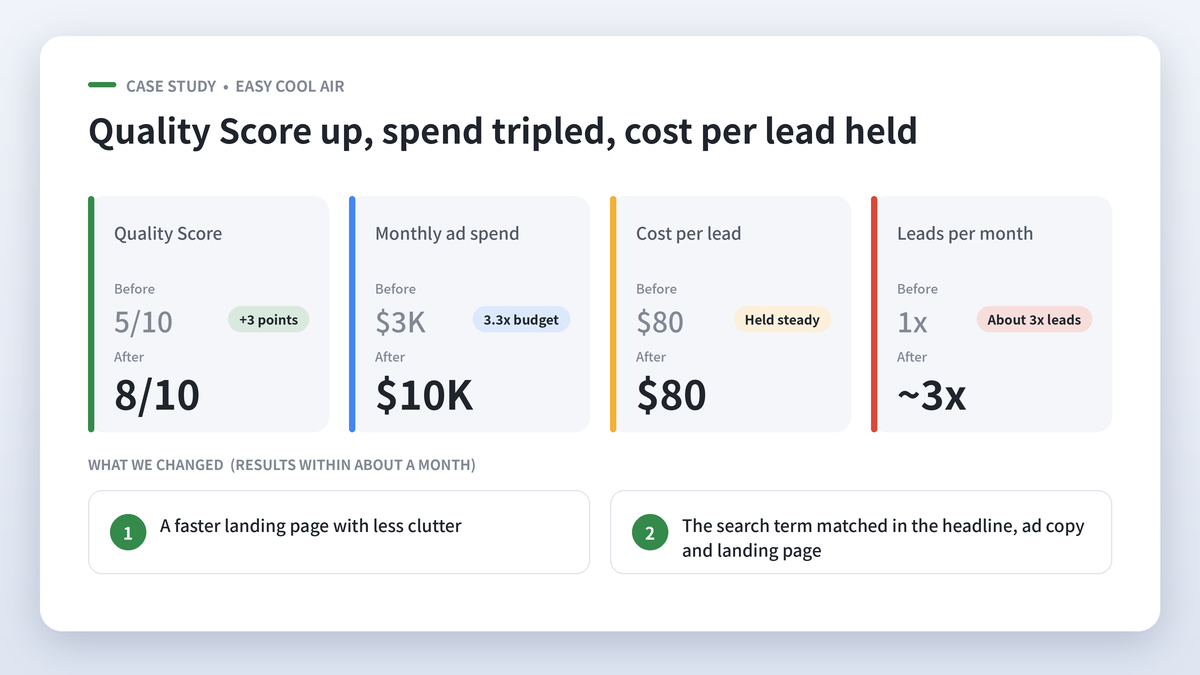
I share this one often because it shows Quality Score is more than a vanity metric. It decides whether you can grow your spend profitably or whether each extra dollar gets more expensive.
Marketing and Detail: Where Most Accounts Win or Lose
Google Ads can put the right person in front of your business. What happens next comes down to marketing, and I’ve learned that small details carry far more weight than most people expect.
Case study: GCB Doors and Windows
GCB Doors and Windows had been with us for a while, and we’d built strong, stable results for them with Google Ads. They decided to try another agency.
One of the first changes the new agency made was removing the call to action button from the top menu on the mobile version of the website. It looks like a small design tweak. Over roughly two months, the cost per lead went from around $30 to $120, a fourfold increase. On top of that, the ads were restructured in a way that left the account messy and far less targeted.
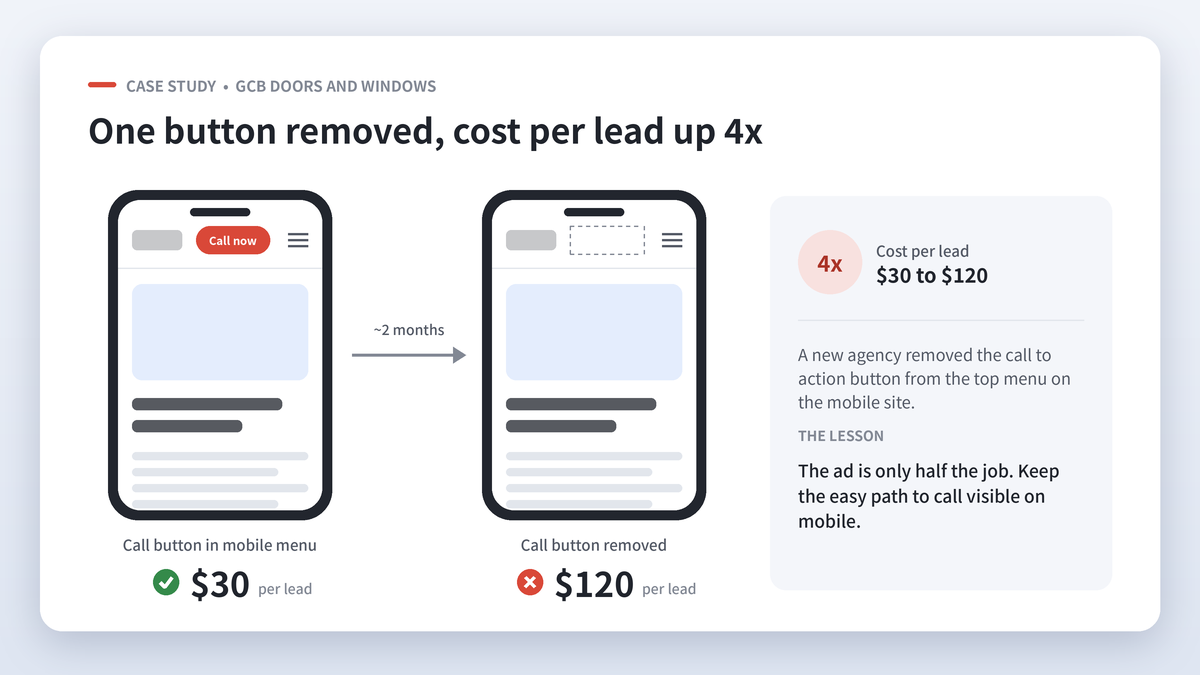
We weren’t monitoring the account at that point, so we only found out when GCB got in touch, frustrated with the results. We brought the account back and restored what had been working.
If I could pass on one lesson from that experience, it’s that the ad is only half the job. One missing button on mobile can be the difference between a profitable campaign and a costly one.
What really moves the needle on the page
Offers and value. A discount, a free quote, a limited time deal or a clear price gives people a reason to act now. For one of our clients running a clearance sale, we added “clearance sale” and related sale keywords directly into the ad headlines. The ads matched exactly what bargain hunters were searching for, and we saw click through rate rise noticeably.
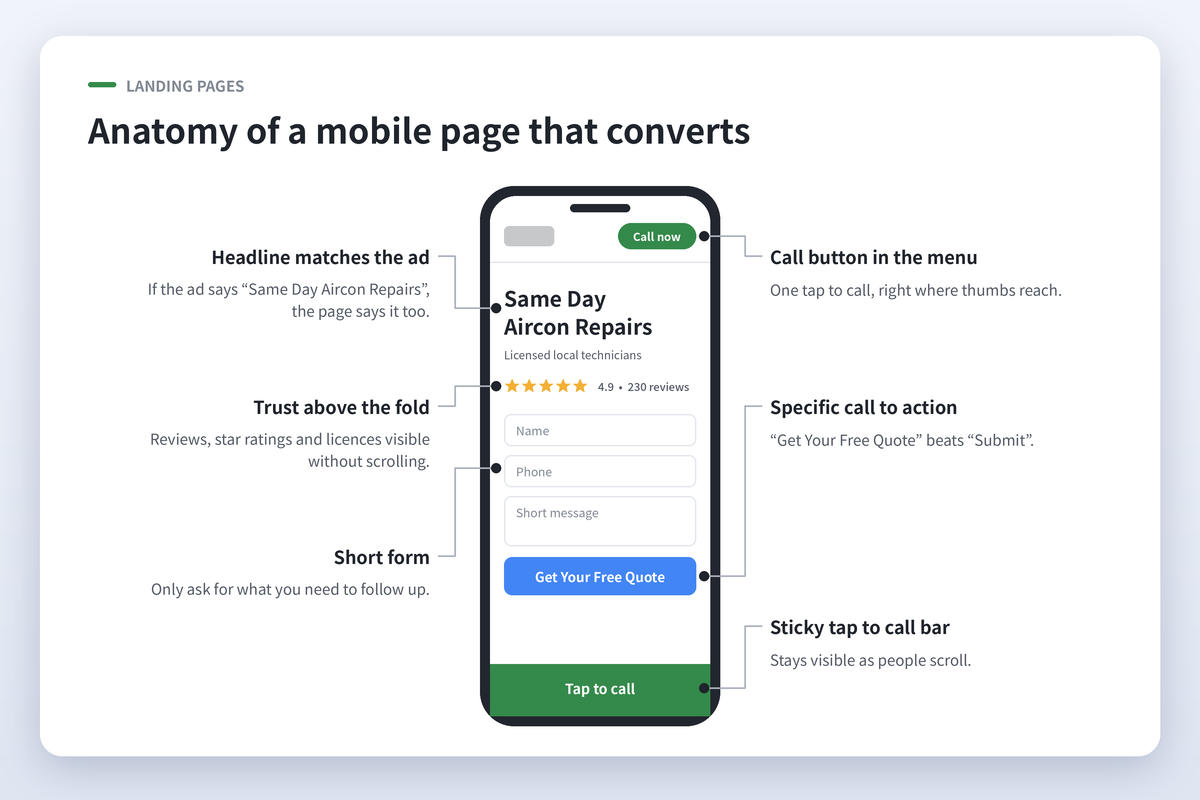
Reduce friction. Every extra form field, pop up or slow loading image costs you leads. I tell clients to ask only for what they need to follow up (name, phone, a short message) and to let people call with one tap.
Trust above the fold. Google reviews, star ratings, licences, years in business and recognisable client logos should be visible without scrolling. People want proof you’re legitimate before they hand over their details.
Message match. If the ad promises “Same Day Air con Repairs”, the landing page heading should say the same thing. When the page feels different from the ad, people hit the back button.
A clear, specific call to action. “Get Your Free Quote” works better than “Submit”. “Call Now for Same Day Service” works better than a phone number sitting on its own.
Speed. A slow page hurts both your conversion rate and your Quality Score. Compress images, remove unnecessary scripts and test the page on a real phone over mobile data.
Keeping a Tight Ship
Once the setup is strong and the marketing is sharp, the job becomes keeping it that way. For me, that means finding the right balance between letting Google’s automation do its thing and keeping firm control.
Automation versus control
Google keeps pushing advertisers toward broad match keywords and automated bidding. Broad match can work, and in some accounts it finds valuable searches you’d never have thought to target. It can also be tricky, especially as Google keeps changing how match types behave, and it can burn budget on loosely related searches.
Personally, I prefer more control, meaning specific keyword targeting with phrase and exact match where it matters. That said, performance reporting shows us exactly which searches produce results, and Google’s automation optimises toward those conversions. So our approach is to test, watch the search terms closely and let the data decide. Automation only works well when it’s fed accurate conversion data, which is another reason we always fix tracking first.
Talk about lead quality
Google counts a form fill as a conversion whether it’s a dream client or a spam message. That’s why we ask our clients for regular feedback on lead quality. Which leads turned into jobs? Which were time wasters? That feedback shapes our keywords, negative keywords, ad copy and even which conversions we tell Google to optimise toward.
Protect your budget from click fraud
Competitors, bots and repeat clickers can drain a budget, particularly in competitive local markets. We use tools like ClickCease to monitor clicks and automatically block suspicious IP addresses, so our clients’ spend goes toward real prospects.
Measure ROAS every quarter
Return on ad spend (ROAS) is the number that tells you whether Google Ads is making you money. I recommend reviewing it at least quarterly, comparing ad spend with the revenue from jobs that came through ads.
This is where the business owner plays a big part. Some of our clients are excellent at it. They track which leads became sales, share the numbers with us and join regular review sessions. Others are a little less proactive, and it’s much harder for us to optimise when that information is missing. We can only help as far as the data allows, and in my experience the clients who drive this and stay accountable are almost always the ones who get the best return.
Mobile experience matters more than ever
Across most of our clients, around 50% of clicks now come from mobile. That changes how your page needs to work.
Think about how you use your own phone. You’re usually busy, often on the move and short on time. When you have high intent, you want the service sorted quickly. You won’t read long paragraphs or fill in a ten field form on a small screen. Your mobile page needs a short, clear message, a tap to call button that’s always visible, and a quick form with only a few fields. The GCB story shows exactly what happens when that easy path disappears.
The 20 Step Google Ads Audit Checklist
I’ve based this checklist on the internal optimisation process our team uses in client accounts, and simplified it so it’s useful whether you’re a beginner or already comfortable in Google Ads. I suggest working through it monthly, and checking search terms and conversions weekly.
Tracking and setup
- Test every conversion action. Submit a form and make a call, then confirm both appear in Google Ads.
- Link Google Analytics and Google Ads. Check the link is active so you can see what people do after they click.
- Check location targeting. Make sure ads show to people physically in your service area, and exclude locations that are sending irrelevant clicks.
- Review your ad schedule and device settings. Make sure ads run when you can actually answer the phone.
Keywords
- Review the search terms report. Look at every search since your last check and add irrelevant terms as negative keywords.
- Check your negative keyword list for mistakes. Make sure you’re not accidentally blocking searches that bring good leads.
- Review match types. Decide which keywords need tighter control with phrase or exact match, and where broad match has earned its place.
- Flag expensive keywords. Find keywords with a cost per click well above your account average.
- Flag keywords with a high cost per conversion. Pause or rework the ones spending well above your average cost per lead.
- Check keyword status warnings. Look for “low search volume”, “below first page bid” and “rarely shown due to low Quality Score” and act on them.
- Keep ad groups tight. Aim for 10 to 15 closely related keywords per ad group.
Quality Score and ads
- Review Quality Score for your key keywords. Note which of the three components is below average and fix that one first.
- Get Ad Strength to Good or Excellent. Add more headlines and descriptions that include your keywords, numbers and offers.
- Compare ad performance. As a rule of thumb, look for a CTR of 2% or more and a conversion rate around 5% for lead generation.
- Check for disapproved or limited ads. Fix and resubmit anything Google has restricted.
- Use every relevant asset. Site links, call-outs, structured snippets, call, location, image, price and promotion assets all add space and clicks.
Landing pages and performance
- Test your landing pages on mobile. Check load speed, broken links, message match with the ad and a clear call to action.
- Review performance by time, device, location and audience. Adjust bids or budgets toward what’s working, and check Auction Insights for new or more aggressive competitors.
- Check your bidding strategy and targets. If your actual cost per acquisition is well below your target, lower the target. If conversions have stalled, test a different strategy.
Budget and control
- Check budget pacing, billing and the Recommendations tab. Make sure spend is on track and payments are current, and review Google’s recommendations one by one. Accept only the ones that suit your goals.
Final Thoughts
A Google Ads audit doesn’t need to be overwhelming. Get your tracking working first, build a clean structure, lift your Quality Score, and treat your ads and landing pages as marketing rather than just settings. Then keep a tight ship, measure what matters and keep talking about lead quality.
If you’d like a second set of eyes on your account, my team and I at Mindesigns would be happy to run a Google Ads audit and show you where the money is leaking. Book your Google Ads audit here.
Frequently Asked Questions
How often should I audit my Google Ads account?
I recommend a full audit at least every 90 days and a lighter review monthly. Check search terms and conversion tracking weekly, because wasted spend adds up quickly.
What is a good Quality Score in Google Ads?
A score of 7 or above is generally considered good, and 6 is a reasonable starting point. If you’re at 5 or below, you’re usually paying more per click than you need to.
How much does a Google Ads audit cost?
It depends on how big and complex the account is. At Mindesigns we start with an initial audit to find the biggest issues before any ongoing management is agreed.
Can I audit my own Google Ads account?
Yes. I designed the 20 step checklist above so business owners and marketing managers can use it themselves. A specialist is most useful for deeper problems like tracking errors, structural issues or scaling spend without the cost per lead rising.
Why is my cost per lead going up in Google Ads?
The most common causes I see are broken conversion tracking, irrelevant search terms, falling Quality Score, stronger competition, and changes to your website or landing page. As the GCB example shows, even removing one call to action button on mobile can have a big effect.
Should I use broad match keywords?
Broad match can find valuable new searches, but it needs accurate conversion tracking and close monitoring of search terms. I usually start with phrase and exact match for more control, then test broad match once there’s enough data.